
 AI Agent ROI Calculator
 Free training: Chatbot crash course
 Whitepaper: The acceptance of chatbots
Quick Reply / Chips / Chips
--> Go to BOTwiki
Quick Replies are a form of interaction in messaging platforms and appear as buttons under a message. Unlike cards, Quick Replies disappear after they have been pressed. Quick replies allow users to click through content in the chatbot instead of typing their request in the input field. If, for example, the chatbot offers a button with the name "Help", it is no different in the end than if the user types in "Help" and sends it. The communication is thus accelerated and the users get an orientation about the topics that the chatbot offers.
Depending on the output channel or messaging platform, different names are used for Quick Replies.
| Messaging platform | Designation |
| Facebook Messenger | Quick Reply, Quick Reply |
| Google Assistant | Suggestion Chips |
| Microsoft Bot Framework | Suggested Actions |
| slack | Slack interactive buttons |
| Skype | HeroCard |
| telegram | Keyboard Buttons |
| viber | keyboards |
Here is an example picture for Quick Replies in Facebook Messenger:

Application in Dialogflow
If you create or edit intents in Dialogflow, you will find several options for replying as a chatbot under the heading Response. Among other things, you have the option of selecting the Quick Reply format and naming the buttons in the form of a list.
A Quick Reply Response is displayed in the messaging platforms as a predefined User Response, which is sent back to Dialogflow by clicking on it.
> Back to BOTwiki
AI Agent Training
--> Go to BOTwiki
AI agent training refers to the continuous improvement of an intelligent digital assistant’s response quality, contextual understanding, and behavior. In the age of generative AI, this involves less manual assignment of intents and focuses primarily on optimizing instruction prompts, refining the knowledge base, and fine-tuning the AI persona.
The goal is for an AI agent to not only understand user queries but also to respond in the right tone, with accurate facts, and within defined parameters. Training is an ongoing process that ensures the AI’s generative freedom remains aligned with business requirements and the reality of user interactions.
What Happens During AI Agent Training
At its core, the goal is to refine the agent’s interaction logic and knowledge base. Instead of rigid recognition patterns, the agent’s “brain” is trained through iterative prompt engineering and data maintenance.
A typical training cycle today includes:
-
Log Analysis & Evaluation: Analysis of dialogues for hallucinations, deviations in tone of voice, or gaps in knowledge.
-
Prompt iterations: Customizing the instructions in the instructions prompt and the AI agent persona to control the agent's behavior and communication style.
-
Knowledge refinement: Optimizing knowledge sources (documents, FAQs) so that Retrieval Augmented Generation (RAG) provides more accurate information.
-
Guardrail tuning: Refining safety filters to ensure that the agent does not make any unwanted or false promises.
When and how often to exercise
Training begins in the design phase with the creation of the AI persona and the dialogue logic. However, it is only after the system goes live that we see how users actually interact with the generative AI. Since LLMs (Large Language Models) can respond to inputs in unpredictable ways, close monitoring is essential.
-
Initial training: Developing the persona, defining areas of responsibility, and connecting the first knowledge sources.
-
Pilot phase: Test runs using a "human-in-the-loop" approach to validate the quality of the generated responses under real-world conditions.
-
Continuous optimization: Regular (weekly) analysis of user feedback and updates to the knowledge base.
-
On-the-spot training: Immediate updates to training materials in response to new company policies or product changes.
Implications for Voice and Chat
Training is particularly critical in the voice channel (e.g., AI hotline). Here, AI agents must learn to handle natural speech flow, interruptions, and acoustic misunderstandings. The training focuses on instructing the agent to grasp the essence of the request even with inaccurate speech-to-text input (dialects, background noise) and to guide the user to the desired outcome through agentic dialogues (active follow-up questions).
In chat and email contexts, the focus is on information density and formal accuracy. The training ensures that agents can accurately summarize complex documents and provide precise written instructions without overwhelming users with overly long blocks of text.
AI Agent Training in Multi-Agent Systems
In modern architectures with multi-agent orchestration, training becomes modular. Instead of training a monolithic system, one trains specialized agents for specific tasks (e.g., a “technical expert” and a “contract assistant”). Each agent receives specific training for its domain:
-
One is trained to make precise API calls (tools).
-
The other is optimized for empathetic problem-solving (Persona). An overarching orchestrator manages the context. In this context, hybrid intelligence means that the training continuously improves both factual knowledge (Knowledge AI) and procedural intelligence (Agentic Workflows).
Frequently Asked Questions (FAQ)
It involves the continuous fine-tuning of prompts and knowledge sources (RAG) to maximize the quality and accuracy of an AI agent’s responses.
AI models are versatile, but they don’t know your specific business rules, products, or brand voice. Training “teaches” the AI to behave exactly as your brand requires.
To some extent. While Knowledge AI (RAG) automatically provides the agent with up-to-date information, manually training the instructions remains important for controlling how that information is conveyed (e.g., in a friendly, factual, or sales-oriented manner).
For voice systems, training focuses on robustness against speech errors and real-time dialogue control. The agent must be trained to interpret pauses correctly and actively guide callers through processes, rather than simply waiting passively for text input.
> Back to BOTwiki
edge case
--> Go to BOTwiki
Edge cases are outcomes of a conversation that are not expected , that rarely occur and therefore represent exceptions in the conversation . These edge cases are created, among other things, within the Conversational Map or the Conversation Flows. The counterpart to edge cases is the Happy Paths are. Here, the expected outcomes of a conversation are described, which are most frequently taken by the user.
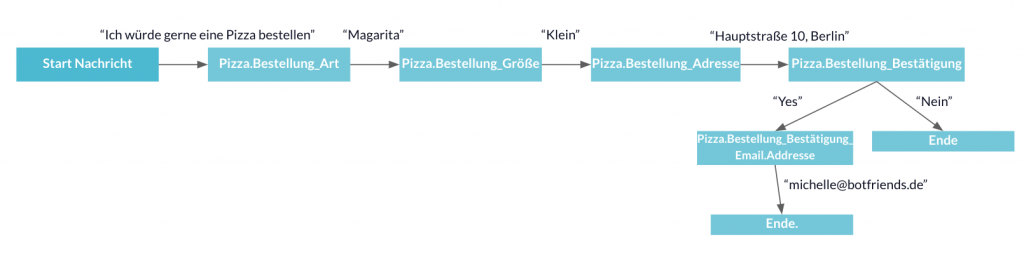
Example for the Happy Path on the Use Case "Order Pizza
This example shows what a "happy" conversation between user and chatbot can look like when ordering a pizza. All information that the user provides to the chatbot can be processed and no misunderstandings arise.
Example for the Edge Case at the Use Case "Order Pizza
This example shows that there can also be great potential for error if the user sends answers that the chatbot cannot process. The graphic below shows that the user enters an address that is outside of Germany. In this case, no delivery can take place. Such edge cases should be considered in advance and mapped in the conversational map. You should ask yourself how to deal with the user in such situations. For example, you can inform the user that you only deliver within Germany or you can give them the option to enter the address again in case of a misunderstanding.

> Back to BOTwiki
System Entities
--> Go to BOTwiki
System entities are predefined entities that are used in an AI agent platform and extract frequently recurring data types from natural language. Typical examples include date, time, location, currency, phone number, or number. While custom entities are created individually for a specific use case, system entities cover universal concepts and reduce training effort.
How System Entities Work
When a user formulates a query, the NLU model first analyzes the intent and simultaneously searches for relevant parameters in the utterance. This is exactly where system entities come into play: they identify standardized data types regardless of the specific wording and return the extracted values in a normalized format.
If a caller says on the phone, “I’d like to schedule an appointment for Tuesday at 10 a.m.,” the AI agent identifies the next Tuesday using a date entity and returns it in ISO format. A time entity simultaneously returns the value 10:00. This normalization is crucial because downstream systems such as calendars, CRM, or ticketing systems require unambiguous values and cannot interpret free-text data.
Types of System Entities
Platforms typically distinguish between three categories that differ in their return values. They are closely related to the concept of entity and extend it with ready-to-use standard types.
- System Mapping: Provides a normalized reference value, such as a date in ISO 8601 format or a currency as a numeric value with a code.
- System Enum: Returns the recognized term exactly as it was spoken, without mapping it to a standard form, such as color names.
- System Composite: Combines multiple entities into a single object, such as a monetary amount consisting of a value and a currency.
Typical predefined entities in modern platforms include date, time, duration, number, ordinal number, monetary amount, quantity, address, city, country, language, person's name, email address, and phone number.
Frequently Asked Questions (FAQ)
System entities are predefined entities that come standard with an AI agent platform. They recognize universal data types such as date, time, location, number, or currency in natural language and return the values in a standardized format. This means that these standard cases do not need to be trained separately.
System entities cover general concepts that are common to many use cases. Custom entities are defined specifically for a project, such as product categories, contract types, or internal designations. In practice, both are combined to reliably capture both universal and domain-specific information.
> Back to BOTwiki
Chatbot Operations
--> Go to BOTwiki
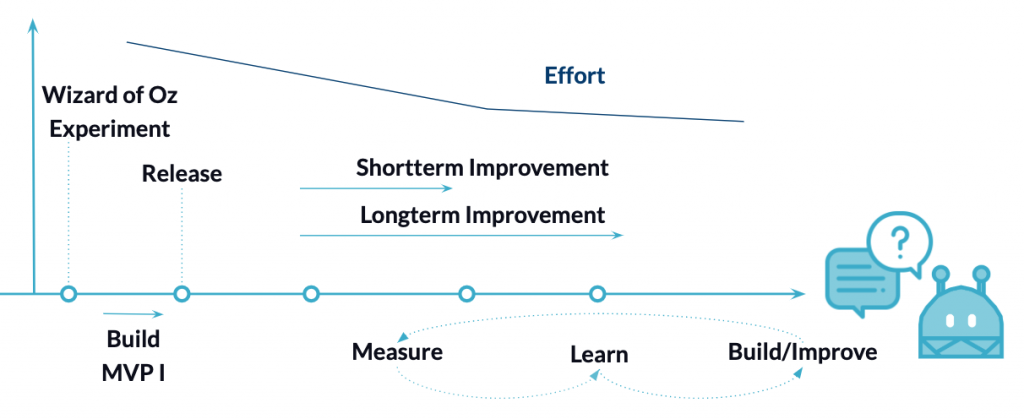
Chatbot Operations starts after the development phase of the chatbot and usually requires the Go Live, i.e. the publication of the chatbot. It is therefore the operation of the chat bot . After real users interact with the chatbot, there is a lot of potential for optimization and, above all, the chatbot must be constantly trained.
The aim is to optimize the chatbot both in the short and long term.
When optimising the chatbot in the short term, the conversations with the users should still be checked daily directly after going live. This can then be reduced after a certain level of training of the chatbot. The most important thing is to train the chatbot. This means correcting incorrect intent assignments, matching new training phrases and adding new content.
In the long term, consideration should be given to whether, for example, the chatbot was the right one. Messenger service was the right one, which existing services work well or poorly, which other questions or processes the chatbot can open up, or whether you want to roll out in other languages or countries.
Chatbot operations can also only be run efficiently with functioning analytics to measure against its goals or KPIs. Own analytic tools can be built or third party tools like Chatbase or Dashbot can be integrated.
Chatbot operation also includes an intent management guideline, which defines processes and rules on how new content is added to the chatbot and what should be taken into account. These guidelines cover topics such as intent granularity, correlation, naming conventions and approval processes.
> Back to BOTwiki
Clustering
--> Go to BOTwiki
In many contexts of data processing it happens that one wants to group units of a type. Clustering refers to an analysis of the data at hand in which a class is assigned to each data point. Data that are similar to each other are grouped together in a cluster. You can use clustering to automatically add new data to existing groups or to analyse existing data for grouping. For this, you do not need sample data that you have previously divided into predefined groups by hand. This is an unsupervised learning procedure.
Application for chatbots
In the context of chatbots, clustering is helpful for initial data analysis if historical data is available. For example, one can determine from the chat history which intents should be created. In the operation of a chatbot, collected sentences that have not met an intent can also be brought into a structure through clustering and new intents can thus be identified.
Functionality:
For clustering, one first needs a data representation. Normally, data are represented as number vectors, with individual dimensions of the vector reflecting properties of the data. In order to group these in a meaningful way, a measure of similarity is needed. In most cases, the Euclidean distance is used for this. [1] Depending on the algorithm, this metric and the way the data are assigned to the groups can vary.
Nearest Neighbour
The simplest way would be to randomly assign a class at the beginning of a certain number of data points, and then for all other points assume the class that your nearest neighbor has.
However, if this method is too inaccurate, it can be extended by considering the classes of several neighbors instead of just one, and choosing the class that occurs most frequently. [2]
Centroid-based processes
The results are even better if centroid-based methods are used. Here, a centre point is determined for each cluster (for example, the mean value of all points in a cluster) and this is used as the reference point for the assignment. At the beginning, these centroids can be set randomly. The distance to all centres is then calculated for the data in each case. The data point is then placed in the cluster to which it has the smallest distance. The centroid is then adjusted accordingly, because adding a point creates a new mean value. The centre moves with time. As soon as a convergence criterion is met (for example, if the changes in the centroids are too small), the algorithm stops. [3][4]
Text representation: Bag of Words
Text data can be represented in vectors in various ways. In simple use cases, for example, one can define a vocabulary that can be thought of as a table. Each word corresponds to an integer (like an ID). With the help of such a table, a sentence can now be converted into a vector. Each sentence corresponds to a vector where each dimension corresponds to a word of the vocabulary. For each word that occurs in the sentence, the dimension is given the value 1, all words that are not present remain at 0. [5]
Text Representation: Deep Learning Models
For a representation that contains more semantic properties of the text, vectors are used that are created by Deep Learning methods. This type of method requires a lot of data. For example, recurrent neural networks (RNNs) can be used to train language models by always predicting the next word for a given word sequence. This works by converting the sequence to a vector in an encoder RN N and using a decoder RNN to translate the vector into the following word. If you now use only the encoder, you get a vector representation of the sentence that has significantly fewer dimensions than a bag-of-words approach and more semantic content.
> Back to BOTwiki
Sources
[1] https://sites.google.com/a/erhard-rainer.com/erhard-rainer/mathematik/distanz-zwischen-zwei-punkten
[2] k-nearest neighbours, https://towardsdatascience.com/k-nearest-neighbours-introduction-to-machine-learning-algorithms-18e7ce3d802a
[3] https://www.youtube.com/watch?v=_aWzGGNrcic
[4] https://www-m9.ma.tum.de/material/felix-klein/clustering/Methoden/K-Means.php
[5] https://machinelearningmastery.com/gentle-introduction-bag-words-model/
Messenger Services
--> Go to BOTwiki
Messenger services refer to text-based communication platforms such as WhatsApp, Facebook Messenger, Telegram, Microsoft Teams, and Slack, which individuals and businesses use to exchange messages in real time. In a B2B context, they have long since evolved from purely personal chat apps into mission-critical communication channels used for customer service, consulting, and internal processes.
From the perspective of an AI agent , messenger services are the touchpoint where most asynchronous customer dialogs take place, making them a central component of modern conversational AI. Anyone orchestrating voice, chat, and email must understand the unique characteristics of each messenger, the target audiences it reaches, and how AI agents can be integrated from both a technical and regulatory standpoint.
What Messenger Services Can Do in a Business Context
Messenger services differ from traditional communication channels like the phone or email in several ways: they are asynchronous, mobile-first, and firmly established in users’ daily lives. A request is made right where the person is already communicating—without switching apps or dealing with login friction. For businesses, this means faster response times, higher response rates, and a lower barrier to communication when it comes to sensitive topics like scheduling appointments, filing complaints, or checking order status.
At the same time, messaging platforms have their own technical rules: business APIs, template messages, 24-hour service windows, opt-in requirements, and varying data protection standards. A professional conversational AI solution must understand these parameters and integrate them seamlessly into AI workflows, rather than treating each channel in isolation.
Overview of relevant messaging services
In the DACH region, a small number of services dominate customer-facing interactions, while international markets and the B2B sector have their own areas of focus. The following platforms are most relevant for AI agents:
- WhatsApp Business: The market leader in customer engagement across Germany, Austria, and Switzerland (DACH), accessible via the official Cloud API for AI agents, with clear guidelines for opt-in and template messages.
- Facebook Messenger: ideal for brands with a strong social media presence; suitable for FAQs, recruiting, and pre-sales consultations.
- Telegram: technically open, popular for communities, newsletters, and status updates, with easy bot integration.
- WeChat: virtually indispensable for companies doing business in China, offering customer service, ordering, and payment all in one app.
- Microsoft Teams and Slack: Standard channels for internal use cases such as IT support, HR self-service, and knowledge bases.
- Apple Messages for Business and RCS: increasingly important for brand-consistent, native conversations on iOS and Android.
When making a selection, the decisive factor is not so much technical coverage as the question of where your target audience can actually be reached and which services can be integrated into existing systems in a legally compliant manner.
Frequently Asked Questions (FAQ)
Messenger services are text-based communication platforms such as WhatsApp, Facebook Messenger, Telegram, or Microsoft Teams that transmit messages in real time between individuals or between businesses and customers. In a B2B context, they are used as a service channel and can be integrated with AI agents via business APIs. They are asynchronous, mobile-first, and are typically deeply integrated into users’ daily lives.
WhatsApp Business and Facebook Messenger are particularly relevant for customer contact in the DACH region, while WeChat is also important in an international context. Microsoft Teams and Slack dominate for internal use cases. The choice should be based on the target audience, the desired reach, and data protection requirements, not simply on the number of available connectors.
Each messaging app has its own requirements regarding order processing, data storage locations, and opt-in procedures. WhatsApp Business, for example, requires explicit consent as well as template messages for proactive communication. Companies in the DACH region should review the relevant contracts, storage locations, and retention periods, and coordinate their choice of communication channels with data protection and IT security teams.
--> Back to BOTwiki
Channel connector
--> Go to BOTwiki
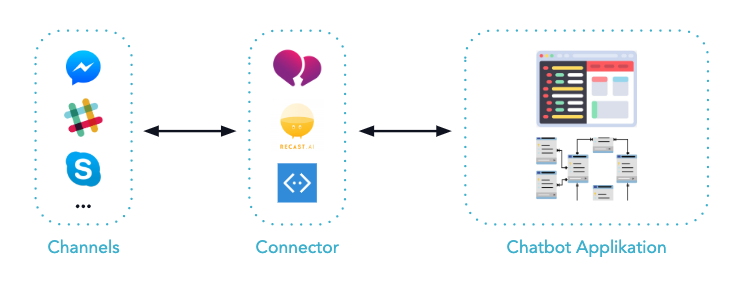
A Channel Connector is a software component that converts messages from various messaging channels into a uniform data format. It is used in the development of chatbot applications when multiple channels need to be supported simultaneously. By using a Channel Connector, the formatting logic is separated from the actual chatbotapplication.
Why Channel Connectors Are Needed
As soon as a chatbot application needs to be accessible via more than one channel, a structural problem arises: each messaging service delivers messages in its own data format. A channel like Facebook Messenger structures incoming messages differently than, say, Slack or WhatsApp. The user message—that is, the actual text of a conversation—is located in a different place within the data set in each of these formats and must therefore be addressed differently.
If this variety of formats is handled directly within the chatbot application, duplicate, channel-specific code segments quickly accumulate. Such duplicates increase maintenance efforts and make it more difficult to further develop the application.
How a Channel Connector Works
A Channel Connector understands the data formats of the connected channels and converts all incoming messages into a common, standardized schema. This ensures that the chatbot application always receives data with the same structure, regardless of the source channel. Similarly, outgoing responses are formatted by the connector according to the specific channel before being forwarded to the respective service.
A concrete example of this principle is Smooch, a service that receives messages from channels such as Slack, Facebook Messenger, WhatsApp, Telegram, and other platforms, consolidates them, and maps them to a custom schema. In this case, the chatbot application communicates exclusively with Smooch, not directly with the individual channels.
Comparison of Data Formats: The Case of Facebook and Slack
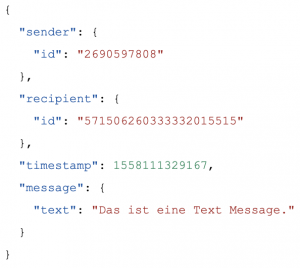
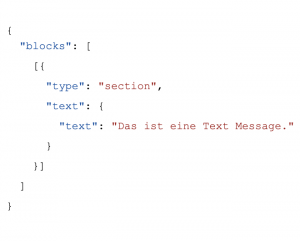
The difference between channel-specific data formats can be clearly illustrated by comparing Facebook Messenger and Slack. In both cases, the data record contains the same payload, such as the text “This is a text message.” However, the path through which this message can be accessed in each dataset differs. In Facebook Messenger, the message is located within a nested structure of object and array levels; in Slack, the structure follows a different schema with different field names.
Without a unifying layer, a separate algorithm would have to be written for each channel to extract the message from its respective format. A channel connector handles this task centrally and provides the chatbot application with a unified access point.
Facebook: [2] Slack: [3]
Benefits for Chatbot Development
Using a channel connector significantly reduces the effort required to integrate new channels. A new channel simply needs to be configured in the connector, without requiring any changes to the core logic of the chatbot application. Existing conversation logic, intents, and response structures remain unchanged and can be used across all channels.
In addition, maintainability is improved because channel-specific format logic is managed in a central location. Changes to a channel format require only a single adjustment in the connector, rather than multiple changes to the application logic.
An API integration refers to the direct technical connection of a single service via its application programming interface. A channel connector, on the other hand, is a higher-level layer that manages multiple such connections and standardizes the resulting data formats. While an API integration is channel-specific, a channel connector enables a chatbot application to communicate with multiple services simultaneously, regardless of the channel.
No, there are both external services like Smooch and platform-integrated solutions, such as those available in BOTfriends X. These handle the normalization of message formats without requiring a custom implementation. In such cases, the effort required to connect to the channel is limited to configuration.
If a channel connector is not used, the chatbot application must include separate formatting logic for each channel. This leads to channel-specific code duplication, increased maintenance costs, and difficulties with scalability. When integrating a new channel, parts of the application logic would need to be rewritten or adapted each time.
Back to the BOTwiki
On Premise
--> Go to BOTwiki
On-premises voicebots and chatbots are conversational systems that run entirely within a company’s own infrastructure and do not require external cloud services for speech processing. They serve as an alternative to cloud-based solutions and are particularly relevant for industries with strict requirements regarding data protection, compliance, and data sovereignty.
For companies in the banking, insurance, healthcare, and government sectors, the choice between on-premises and EU-hosted models is often a critical decision. In modern architectures, on-premises solutions are considered part of an AI agent platform that integrates voice, chat, and email into a multi-agent orchestration.
What Makes On-Premise Special
With an on-premises voicebot or chatbot, all relevant components—speech recognition, dialogue control, knowledge AI, and backend integration—are hosted on the company’s servers or in a dedicated private environment. Conversation data never leaves this infrastructure and is neither shared with third-party providers for training purposes nor processed in public cloud regions. This is crucial whenever personal data, contract details, or patient data are mentioned in the dialogue.
From a technical standpoint, on-premises solutions differ in that external NLU services from commercial cloud providers cannot be used out of the box. Instead, open-source or self-hosted language models are used.
GDPR, EU Hosting, and Made in Germany
The driving force behind on-premises solutions is regulatory compliance. The GDPR, industry-specific regulations such as BAIT, KAIT, or VAIT, and internal corporate policies require control over where data is processed. On-premises solutions or dedicated EU hosting in German data centers minimize risks associated with transfers to third countries.
- Full control over conversation data and audio recordings from voice channels.
- Hosting in German or European data centers, optionally "Made in Germany."
- A clear distinction between production data and training data.
- Transparent processing inventories for data protection officers and auditors.
Implications for Voice and Chat
In the voice channel, for example, with a voicebot used for triage in the hotline of an insurance company or a hospital network, the on-premise question is particularly sensitive, as call data contains voice profiles, medical details, or contract information.
In chat and email contexts—such as employee support or the claims reporting process—on-premises chatbots become essential as soon as knowledge sources containing confidential information are integrated. Knowledge AI running on your own servers incorporates internal documents, contracts, and tickets into the conversation without exposing them to external models.
Disadvantages of on-premises solutions
In practice, a purely on-premises environment is not always cost-effective. High-performance language models, continuous training, and the operation of a scalable conversational AI platform can be burdensome when everything runs exclusively in-house.
Frequently Asked Questions (FAQ)
An on-premises chatbot is a conversational AI agent whose components for natural language processing, dialogue management, and knowledge integration are operated entirely within a company’s own infrastructure. Conversation data never leaves this environment and is not transmitted to external cloud providers. This makes the model particularly suitable for industries with strict data protection and compliance requirements.
On-premises solutions are particularly appropriate when regulatory requirements, industry-specific supervisory requirements, or internal security policies preclude external data processing. Typical sectors include banking, insurance, healthcare, public administration, and critical infrastructure. In less sensitive areas, however, an EU cloud solution with clear data processing agreements is often sufficient.
With on-premises deployment, the solution runs in the customer’s own data center or a dedicated private environment. EU hosting means that the solution is operated in a cloud region within the EU, often with German locations and a “Made in Germany” designation. Both models address data protection requirements but differ in terms of control, effort, and scalability.
Yes, voicebots can generally be deployed on-premises or on a dedicated EU hosting platform, ensuring that audio data and transcripts never leave the controlled environment. The architectural decision should be made on a case-by-case basis, taking into account load profiles, latency requirements, and the regulatory framework.
On-premises chatbots require more in-house effort when it comes to operating language models, scaling infrastructure, and ongoing monitoring. Since many high-performance models are primarily offered as cloud services, on-premises solutions often require the use of alternative or self-hosted models.
--> Back to BOTwiki
Happy Path
--> Go to BOTwiki
The happy path describes the ideal and smooth flow of a process or conversation. It is the expected path along which a goal is achieved without deviations or errors. This process path is considered the most efficient and cost-effective, as no unexpected events or problems occur.
In the field of conversational AI, especially with chatbots and voicebots, the happy path represents the most frequently and successfully used interaction paths by users. It is used for the design and optimization of dialogues to ensure that user requests are handled efficiently and that a positive interaction is experienced.
Distinction from the unhappy path and edge case
In contrast to this are the "unhappy paths" or "edge cases." These are alternative scenarios that occur when users deviate from the ideal path. Reasons for this can include incorrect entries, unexpected requests, or technical malfunctions. While the happy path represents the norm (e.g., successful password entry), edge cases cover the exceptions (e.g., forgotten password, incorrect format, system timeout). A clear understanding of both concepts is essential for developing robust systems. Historically, the focus was often purely on core functionality, but with the rise of UX design, a holistic view of all potential user paths, including edge cases, has become the standard.
How does the Happy Path work?
The Happy Path is not a technical system in itself, but rather a design and testing concept based on careful planning and analysis. Its "functionality" lies in the methodical conception and validation of the ideal user flow.
- Target group definition and requirements analysis: The first step is to precisely define the user goals. What does the primary user want to achieve in 80% of cases? For an e-commerce chatbot, this would be "find and purchase a product," for example.
- User journey mapping: The ideal process is visualized step by step. This often takes the form of flowcharts or user journey maps. Every point of interaction (touchpoint) is defined, from the user's initial inquiry to successful completion.
- Conversational design (conversational AI): In the context of chatbots, conversation flows are designed. For the happy path, this means asking clear questions, offering unambiguous answer options, and requesting the necessary information in a logical order.
4. Prototyping and validation: A prototype of the process is created and tested. In happy path testing is used to check whether the defined ideal path works perfectly from a technical standpoint. Only valid data and expected actions are used for this.
Example for the Happy Path on the Use Case "Order Pizza
This example shows what a "happy" conversation between user and chatbot can look like when ordering a pizza. All information that the user provides to the chatbot can be processed and no misunderstandings arise.
Example for the Edge Case at the Use Case "Order Pizza
This example shows that there can also be great potential for error if the user sends answers that the chatbot cannot process. The graphic below shows that the user enters an address that is outside of Germany. In this case, no delivery can take place. Such edge cases should be considered in advance and mapped in the conversational map. You should ask yourself how to deal with the user in such situations. For example, you can inform the user that you only deliver within Germany or you can give them the option to enter the address again in case of a misunderstanding.
Areas of application and use cases
The Happy Path is a universal concept that applies to all digital interactions in which a user pursues a goal.
- Customer service automation: An AI agent for reporting insurance claims follows the happy path by guiding the user through the required information (policy number, date of claim, description) in a structured manner, without the user interrupting the process or requiring human assistance.
- Automated appointment scheduling: An AI scheduler coordinates a meeting between three participants by comparing their calendars, finding a slot that works for everyone, and sending out invitations, without the need for lengthy back-and-forth correspondence about alternative dates or time zone conflicts.
- E-commerce shopping assistant: A shopping agent accurately identifies a replacement part based on an uploaded photo, checks compatibility with the user's stored device model, and adds the item directly to the shopping cart without the customer having to manually compare technical specifications or contact support.
A well-defined happy path solves the problem of process complexity by minimizing cognitive effort for the user and maximizing efficiency. Industry benchmarks show that reducing the number of steps in the checkout process (an optimized happy path) can increase conversion rates by 20-30%.
Advantages and challenges
Focusing on the happy path offers clear advantages, but also poses challenges if edge cases are neglected.
Advantages:
- Improved user experience
- Higher conversion rates
- Efficient development
- Simpler testing
challenges
- Risk of oversimplification
- Frustration when things don't go as planned
- Incomplete picture
The biggest challenge is finding the right balance: optimizing the happy path without neglecting robust mechanisms for handling exceptions.
Frequently Asked Questions (FAQ)
The happy path describes the ideal, error-free path a user takes to achieve their goal: the expected standard scenario. An edge case, on the other hand, is a rare exception that occurs when the user deviates from the ideal path, e.g., due to an unexpected input or a system error. The happy path is the rule, the edge case is the exception, but it must also be taken into account for a robust system.
From an organizational perspective, you need a clear understanding of user goals and primary business processes. Technically, analysis tools (e.g., web analytics, CRM data) are crucial for identifying the most common user paths. In addition, an interdisciplinary team of UX designers, product managers, and developers is necessary to holistically design and validate the process, from the initial sketch to the final test.
The duration depends heavily on the complexity of the process. A simple process such as newsletter registration can be optimized in a few days. A complete checkout or onboarding process can take considerably more time. Factors include the quality of the existing data, the complexity of the system integration, and the scope of the A/B testing required to validate the improvements.
The costs primarily include human resources for analysis, design (UX/UI), technical development, and testing. License costs for analysis or A/B testing tools may also be added. The total cost of ownership (TCO) should be weighed against the expected return on investment (ROI), which results from higher conversion rates, increased efficiency, and improved customer satisfaction.
A development focused purely on the happy path is not recommended. The best approach is holistic "journey optimization." This involves optimizing the happy path as priority 1, while also identifying the most common unhappy paths and providing robust error handling and alternative solutions. The goal is a fault-tolerant system that reliably guides users to their destination even when they deviate from the ideal path.
> Back to BOTwiki