
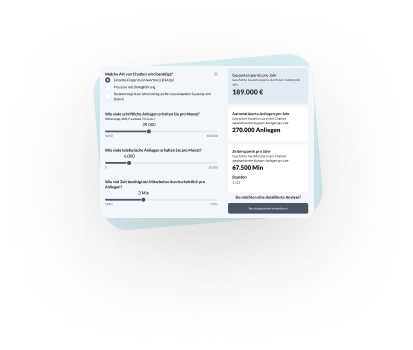
 AI Agent ROI Calculator
 Free training: Chatbot crash course
 Whitepaper: The acceptance of chatbots
On Premise Chatbots
--> to the BOTwiki - The Chatbot Wiki
Chatbots that are able to work independently of external services are considered on premise chatbots. On Premise can therefore be seen as the counterpart to a cloud. [1]
This approach ensures that conversations of the bot do not reach third-party providers. It follows, however, that services for the artificial intelligence of a bot can no longer be obtained from cloud providers such as Google Dialogflow. Natural language understanding must therefore either be developed in-house or rely on open source and on premise solutions. Examples would be RASA, ana.chat or botpress. [2,3]
Another approach is the hybrid cloud. Here, cloud components are mixed with on premise solutions. [4] This ensures control over conversations and, at the same time, complex services such as Dialogflow for Natural Language Processing can be obtained from the cloud. [5]
> Back to BOTwiki - The Chatbot Wiki
Sources
[1] Seo-United, What is On Premise? [https://www.seo-united.de/glossar/on-premises/
[2] ana.chat [https://www.ana.chat/
[3] botpress [5] https://botpress.io/
[4] NetApp, What is a hybrid cloud? https://www.netapp.com/de/info/what-is-hybrid-cloud.aspx
[5] DialogFlow https://dialogflow.com/
Happy Path
--> to the BOTwiki - The Chatbot Wiki
The happy path describes the ideal and smooth flow of a process or conversation. It is the expected path along which a goal is achieved without deviations or errors. This process path is considered the most efficient and cost-effective, as no unexpected events or problems occur.
In the field of conversational AI, especially with chatbots and voicebots, the happy path represents the most frequently and successfully used interaction paths by users. It is used for the design and optimization of dialogues to ensure that user requests are handled efficiently and that a positive interaction is experienced.
Distinction from the unhappy path and edge case
In contrast to this are the "unhappy paths" or "edge cases." These are alternative scenarios that occur when users deviate from the ideal path. Reasons for this can include incorrect entries, unexpected requests, or technical malfunctions. While the happy path represents the norm (e.g., successful password entry), edge cases cover the exceptions (e.g., forgotten password, incorrect format, system timeout). A clear understanding of both concepts is essential for developing robust systems. Historically, the focus was often purely on core functionality, but with the rise of UX design, a holistic view of all potential user paths, including edge cases, has become the standard.
How does the Happy Path work?
The Happy Path is not a technical system in itself, but rather a design and testing concept based on careful planning and analysis. Its "functionality" lies in the methodical conception and validation of the ideal user flow.
- Target group definition and requirements analysis: The first step is to precisely define the user goals. What does the primary user want to achieve in 80% of cases? For an e-commerce chatbot, this would be "find and purchase a product," for example.
- User journey mapping: The ideal process is visualized step by step. This often takes the form of flowcharts or user journey maps. Every point of interaction (touchpoint) is defined, from the user's initial inquiry to successful completion.
- Conversational design (conversational AI): In the context of chatbots, conversation flows are designed. For the happy path, this means asking clear questions, offering unambiguous answer options, and requesting the necessary information in a logical order.
4. Prototyping and validation: A prototype of the process is created and tested. In happy path testing is used to check whether the defined ideal path works perfectly from a technical standpoint. Only valid data and expected actions are used for this.
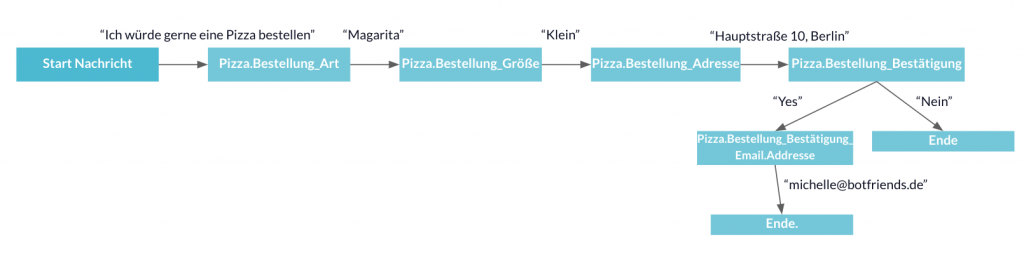
Example for the Happy Path on the Use Case "Order Pizza
This example shows what a "happy" conversation between user and chatbot can look like when ordering a pizza. All information that the user provides to the chatbot can be processed and no misunderstandings arise.
Example for the Edge Case at the Use Case "Order Pizza
This example shows that there can also be great potential for error if the user sends answers that the chatbot cannot process. The graphic below shows that the user enters an address that is outside of Germany. In this case, no delivery can take place. Such edge cases should be considered in advance and mapped in the conversational map. You should ask yourself how to deal with the user in such situations. For example, you can inform the user that you only deliver within Germany or you can give them the option to enter the address again in case of a misunderstanding.

Areas of application and use cases
The Happy Path is a universal concept that applies to all digital interactions in which a user pursues a goal.
- Customer service automation: An AI agent for reporting insurance claims follows the happy path by guiding the user through the required information (policy number, date of claim, description) in a structured manner, without the user interrupting the process or requiring human assistance.
- Automated appointment scheduling: An AI scheduler coordinates a meeting between three participants by comparing their calendars, finding a slot that works for everyone, and sending out invitations, without the need for lengthy back-and-forth correspondence about alternative dates or time zone conflicts.
- E-commerce shopping assistant: A shopping agent accurately identifies a replacement part based on an uploaded photo, checks compatibility with the user's stored device model, and adds the item directly to the shopping cart without the customer having to manually compare technical specifications or contact support.
A well-defined happy path solves the problem of process complexity by minimizing cognitive effort for the user and maximizing efficiency. Industry benchmarks show that reducing the number of steps in the checkout process (an optimized happy path) can increase conversion rates by 20-30%.
Advantages and challenges
Focusing on the happy path offers clear advantages, but also poses challenges if edge cases are neglected.
Advantages:
- Improved user experience
- Higher conversion rates
- Efficient development
- Simpler testing
challenges
- Risk of oversimplification
- Frustration when things don't go as planned
- Incomplete picture
The biggest challenge is finding the right balance: optimizing the happy path without neglecting robust mechanisms for handling exceptions.
Frequently Asked Questions (FAQ)
WWhat is the difference between the happy path and an edge case?
The happy path describes the ideal, error-free path a user takes to achieve their goal: the expected standard scenario. An edge case, on the other hand, is a rare exception that occurs when the user deviates from the ideal path, e.g., due to an unexpected input or a system error. The happy path is the rule, the edge case is the exception, but it must also be taken into account for a robust system.
What are the requirements for defining a happy path?
From an organizational perspective, you need a clear understanding of user goals and primary business processes. Technically, analysis tools (e.g., web analytics, CRM data) are crucial for identifying the most common user paths. In addition, an interdisciplinary team of UX designers, product managers, and developers is necessary to holistically design and validate the process, from the initial sketch to the final test.
How long does it take on average to implement an optimized happy path?
The duration depends heavily on the complexity of the process. A simple process such as newsletter registration can be optimized in a few days. A complete checkout or onboarding process can take considerably more time. Factors include the quality of the existing data, the complexity of the system integration, and the scope of the A/B testing required to validate the improvements.
What are the costs associated with optimizing a happy path?
The costs primarily include human resources for analysis, design (UX/UI), technical development, and testing. License costs for analysis or A/B testing tools may also be added. The total cost of ownership (TCO) should be weighed against the expected return on investment (ROI), which results from higher conversion rates, increased efficiency, and improved customer satisfaction.
What alternatives are there to focusing solely on the happy path?
A development focused purely on the happy path is not recommended. The best approach is holistic "journey optimization." This involves optimizing the happy path as priority 1, while also identifying the most common unhappy paths and providing robust error handling and alternative solutions. The goal is a fault-tolerant system that reliably guides users to their destination even when they deviate from the ideal path.
> Back to BOTwiki - The Chatbot Wiki
Conversational Design
--> to the BOTwiki - The Chatbot Wiki
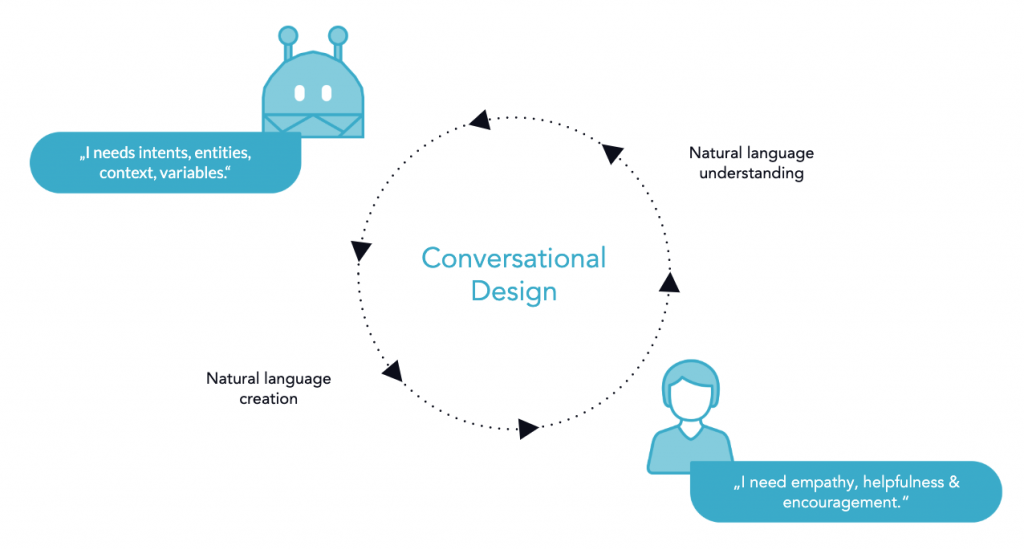
Conversational design is one of the most important parts of the chatbot development process. It is the cornerstone of a good chatbot user experience. This phase takes place before the actual technical development. The following aspects are examined in more detail:
Use Case Definition
Chatbots can be used everywhere where communication takes place. Therefore, it is important in conversational design to identify the exact problems that can be solved with chatbots in order to create clear added value. In this conception phase, the goals that the chatbot should fulfil are also worked out. Then, as in classic development, user stories are created that contain the functions of the chatbot.
"If chatbots can convince your customers that they're human, but can't resolve their issues, what are you really accomplishing." Kevin McMahon - Director of mobile development, SPR Consulting
Target group definition
Many decisions in the conception phase depend on the actual users of the chatbot. In order to identify the exact target group of the chatbot, so-called personas, i.e. archetypal users, are developed. These represent the user groups of the chatbot. As a rule, very different personas are created in order to get a good picture of the user group. When creating a persona, characteristics such as name, age, place of residence, education or their level of digitalisation are defined. Most important are the needs of the target group, which the chatbot should address.
Chatbot personality and tonality
The chatbot is seen as a representative of the company, which it represents in conversations with users. The value system and the tone of the company should also be reflected in the language of the chatbot. Therefore, a detailed personality or character is attributed to the chatbot, with a fixed value system. This is necessary to maintain a tonewhen formulating the chatbot's responses.
> Conversational Map
> Conversational Testing
> Back to BOTwiki - The Chatbot Wiki
Guided Communication
--> to the BOTwiki - The Chatbot Wiki
Guided communication is a set up style of a chatbot. There are 2 ways for chatbots to communicate. The first is guided communication, where you can navigate exclusively through buttons, and the second is free text input, where users interact with the chatbot by typing natural sentences. As the name suggests, in the first case the user is guided through the chatbot's content with the help of buttons and thus only has the option of clicking to access certain content.

What are the advantages and disadvantages of guided communication?
Clear advantages of guided communication are quite simple. The user can only see the content that has been developed. This makes it very easy to quickly develop and launch a first chatbot. It avoids the difficulty of recognizing natural language by taking a rule-based approach. Another advantage is that the user cannot be disappointed because he does not get an answer to his question, but the user knows that the chatbot can only answer what is also accessible via buttons. In addition, communication can be accelerated if only buttons have to be clicked instead of typing entire sentences. In this way, the user reaches his or her goal more quickly.
A resulting disadvantage is the following: Through the rules-based approach, one loses a lot of technology and the advantages of open natural communication. Users feel most comfortable when they can communicate in a natural way, as they do in their everyday lives. Another disadvantage of purely guided communication is that complex chatbot use cases cannot be mapped because the interaction options are very limited.
How is guided communication used?
Guided communication should always be integrated in combination with free text input. This allows the advantages of guided communication to be exploited and avoids the disadvantages of free text communication. Furthermore, it is very good to work with buttons to give the user a framework of what content can be answered by the chatbot.
> Back to BOTwiki - The Chatbot Wiki
Trainings Phrases / Utterances
--> to the BOTwiki - The Chatbot Wiki
Training phrases are a main component of intents. They serve to recognise the previously defined user intentions in the best possible way. For each intent, different question variations are stored in a knowledge base. [1][2][3]
Examples for Training Phrases / Utterances
The following examples show different formulations, all aimed at the same purpose, the weather:
"How will the weather be tomorrow",
"Do I need an umbrella tomorrow?"
"Is there bathing weather tomorrow in Würzburg?"
Scope of Training Phrases / Utterances
How many training phrases are recommended per intent depends strongly on the technology used. The following table shows BOTfriends' experience with the Dialogflow tool.
| Number of training phrases/recognition by Dialogflow | Intent recognition |
| < 5 | Bad |
| < 15 | alright |
| < 50 | good |
| < 100 | Very good |
*It is noted that with Dialogflow more utterances lead to better intent recognition. With other providers, it was found that the quality of the intent recognition decreases again with too many utterances.
Of course, the number of question variations also depends strongly on the use case. In principle, it should be ensured that as many different question variations as possible are included and that the utterances do not overlap with other intents in order to avoid an intent correlation.
> Back to BOTwiki - The Chatbot Wiki
Sources
[1] https://dialogflow.com/docs/intents
[2] https://docs.microsoft.com/en-us/azure/cognitive-services/luis/luis-concept-utterance
[3] https://cloud.ibm.com/docs/services/assistant?topic=assistant-intents
Human Handover
--> to the BOTwiki - The Chatbot Wiki
A human handover (also human takeover, human handoff) is the forwarding of a conversation from a human to a real person. Chatbot to a real human being.
The term Human Takeover is usually used when the conversation is not handed over, but the person actively takes over a conversation.
Trigger for the Human Handover
A human handover can be triggered by different scenarios:
- Explicit question of the beneficiaries for a person
- The chatbot doesn't know the answer to a certain question (default fallback intent is hit)
- The chatbot is not confident enough (low confidence level)
- The sentiment of the users shows a negative value (Sentiment Score)
- A specific intent is made where human intervention is desired or required
- Certain metrics, such as the shopping cart of an online shop, contain products worth > 1,000 €.
Warm/ Cold Human Handover
A warm handover refers to the immediate forwarding of the user to a staff member. The human response is played out to the user promptly and in the same channel.
A cold handover, on the other hand, interrupts the flow of conversation and/or changes the channel. A common example of this is a handover from Facebook Messenger to the email channel.
Tools for Human Handover
A handover can be integrated into various tools:
- Social Media Engagement Tools
- Call Center Software
- Slack / Facebook Messenger
- Human Handover Tools
> Back to BOTwiki - The Chatbot Wiki
Tone of voice
--> to the BOTwiki - The Chatbot Wiki
The tone of voice (or tonality) represents the specific way in which an AI agent in the form of a chatbot or voicebot. It encompasses the choice of words, sentence structure, and general communication style that shape the personality of the digital assistant. A consistent tone of voice strengthens brand identity and significantly influences the user experience in conversational AI.
Elements of tone of voice
The tone of voice of a chatbot or voicebot is determined by several components that together form its linguistic identity. Conscious design of these elements is necessary for coherent communication.
The choice of words and style determine whether formal or informal expressions are used and to what extent technical jargon is employed. Sentence structure is also taken into account, with a decision being made as to whether short, concise sentences or more complex formulations are preferred.
Emotionality and empathy emotionality and empathy also play a role, especially when dealing with user emotions, complaints, or errors. The use of pictograms and emojis can further complement the style and must be handled consistently.
Significance for conversational AI and AI agents
A well-defined tone is crucial to the success of conversational AI applications and AI agents . It strengthens brand identity and promotes recognition. This contributes significantly to establishing a consistent brand message.
In addition, the user experience (UX) is positively influenced. A pleasant and consistent tone of voice promotes user confidence in the digital assistant and increases its acceptance. Misunderstandings can be reduced through clear communication that is appropriate to the context. Consistent application of tone of voice across different channels and AI agents, including chatbots, voicebots, and within workflows, is essential.
Factors for determining tonality
Various factors determine the appropriate tone to use. These include the company's current communication style on other channels, the direct customer approach (e.g., "you" or "you"), the specific use case of the AI agent, and the target audience to be addressed. The company's values, beliefs, and ethical guidelines are also taken into account to ensure stylistic consistency across all forms of communication.
Questions regarding the determination of a good tonality may therefore include the following:
- How does communication with customers currently take place on other channels?
- How are my company's customers addressed? (You)
- Which expression suits my use case?
- Which target group do I want to address with the chatbot or voicebot?
- Which values, beliefs, and ethics does my company embody in terms of communication?
- Which guidelines and guidelines already exist with regard to external presentation?
- Should the chatbot use emojis ?
Control and adaptation in AI systems
The tone of voice of generative AI is shaped by the complex training process and the underlying database. In pre-training, AI systems learn general language structures and contextual relationships.
In the BOTfriends X platform, you can create and use your own AI agent personas, within which the language style is defined in detail. Parameters for this include, for example, the tone of voice, the language characteristics, or the length of the responses.
This AI agent personas are used to generate individual communication patterns and adapt responses to the respective application purpose. Retrieval Augmented Generation (RAG) is often used for company-owned knowledge databases to deliver more accurate and reliable information in the desired tone.
Frequently Asked Questions (FAQ)
How is the tone of voice of a chatbot or voicebot determined?
The tone of voice of a chatbot or voicebot is determined by the company's communication strategy, the target audience, the specific use case, and the style of expression established on other channels. Key design questions include the type of customer approach, the company's values, and compliance with existing guidelines for external communication. These considerations enable the creation of a consistent and brand-appropriate interaction style.
What role does tone of voice play in the user experience?
The tone of voice is very important for the user experience, as it influences how users perceive and accept information. An empathetic, factual, or informal tone of voice can improve interaction and increase trust in the AI agent. An inappropriate tone, on the other hand, can lead to misunderstandings or a negative user experience, especially when dealing with complex or emotional topics.
Can the tone of voice of AI systems be customized?
Yes, the tone of AI systems can be customized. In our BOTfriends X platform, the various aspects of tone are defined in separate AI agent personas that can be used flexibly.
> Back to BOTwiki - The Chatbot Wiki
(Default) Fallback Intent
--> to the BOTwiki - The Chatbot Wiki
The fallback intent (also default fallback intent, fallback message, fallback message, error message, fallback interaction) is played if the chatbot cannot assign the user's request to an existing intent or if the confidence score of the assigned intents is too low.
Recommended structure of Fallback Intents
As the Fallback Intent is potentially one of the most played messages, special attention should be paid to the structure and the Conversational Copywriting of the Fallback message:
- Clearing up the misunderstanding
- Remind the user of the capabilities and limitations of the chatbot.
- Call to action: What can the user do next (make suggestions)?
It is equally important to vary the fallback message so that the user does not receive the same message repeatedly.
> Back to BOTwiki - The Chatbot Wiki
Voice Bot / Assistant
--> to the BOTwiki - The Chatbot Wiki
A voice bot is a special form of a conversational user interface and is the counterpart to a chatbot. Conversational user interfaces make it possible to communicate with computer systems in natural language. The input and output of a voice bot is realised via spoken language.
The technology of Voice Bots
The computer is able to convert the incoming speech into text using a Speech-To-Text Converter. The converted text is then interpreted and processed by the system using Natural Language Processing. The output of the speech is done by a Speech-To-Text technology.
For example, the Cloud Services Speech-To-Text and Text-To-Speech from Google and other providers can be used to convert spoken language into text.[1]
Application areas of Voice Bots
Classic voice bots are the Virtual Assistants Alexa from Amazon, Siri from Apple and the Google Assistant, which are mainly operated with voice. However, these can also be addressed by text input. Voice bots can also be found in the smart home area, where they can be used to control the lamps or the heating, for example, using voice commands. [2]
> Back to BOTwiki - The Chatbot Wiki
Sources
[1] https://cloud.google.com/speech-to-text/
[2] Gartner IT Glossary, 2019, "Virtual Assistant".
Conversational Map / Conversational Flow
--> to the BOTwiki - The Chatbot Wiki
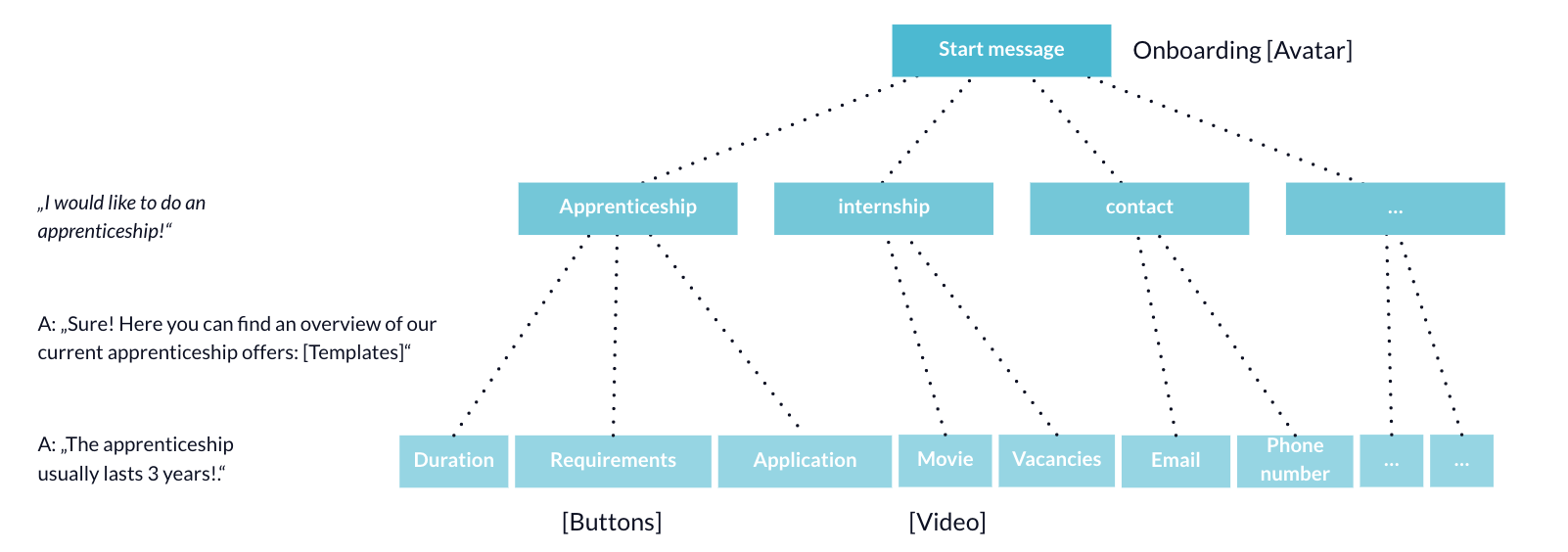
A conversational map is a visual representation of a chatbot conversation. The conversation threads it contains show how the user can go through the individual stages of communication. The map serves as a support in the conception phase and the development by depicting the individual steps of the chat process.
Why is a Conversational Map helpful?
Through the conceptualisation of a chatbot, all stakeholders involved in the project receive an overview of all possible chatbot characteristics and scenarios. On the one hand, this is good for checking whether any content components have been forgotten, and on the other hand, weak points in the conversation structure can be identified very quickly, showing where the user might not get anywhere. With the various communication processes, one speaks of either Happy Paths or Edge Cases. Furthermore, a conversational map helps to play through a classic user journey of a user and to make adjustments if necessary.
Structure of a Conversational Map
The structure of a project can very well be divided into stages, which already give an overview of the complexity and granularity. There are important components that need to be considered across stages. For example: Where do I use which media (images, buttons, cards, etc.) or which features belong to this conversation step (e.g. sending an email)? Furthermore, you have to think about the style of the chatbot at the beginning. Should the chatbot be a pure click bot or should it be possible to have a free text conversation or a mix of both?
In all cases it is important to think about the answers of the chatbot in each step and to include them in the Conversational Map.
Important levels of a Conversational Map
- Welcome Message / Start Message (greeting, address, avatar)
- Onboarding (clarification of the functionality and the expected content)
- Content levels (depending on the depth and granularity of the content)
- Error Message (How does the chatbot react if something went wrong?)
- Back Message (How can the user navigate back?)
> Back to BOTwiki - The Chatbot Wiki